

Product tour

A day at an example practice, in seven screens

Every picture is the real product, open on the example workspaces you’ll see named in it: “Example: Single dental practice”, a made-up practice whose office is Desert Bloom Dental, and, for running several offices, “Example: Four-office dental group”. The patients, phone numbers, and visits are invented. Nothing in it is a real patient.

Step 1 of 7

A 9:40 PM question, answered

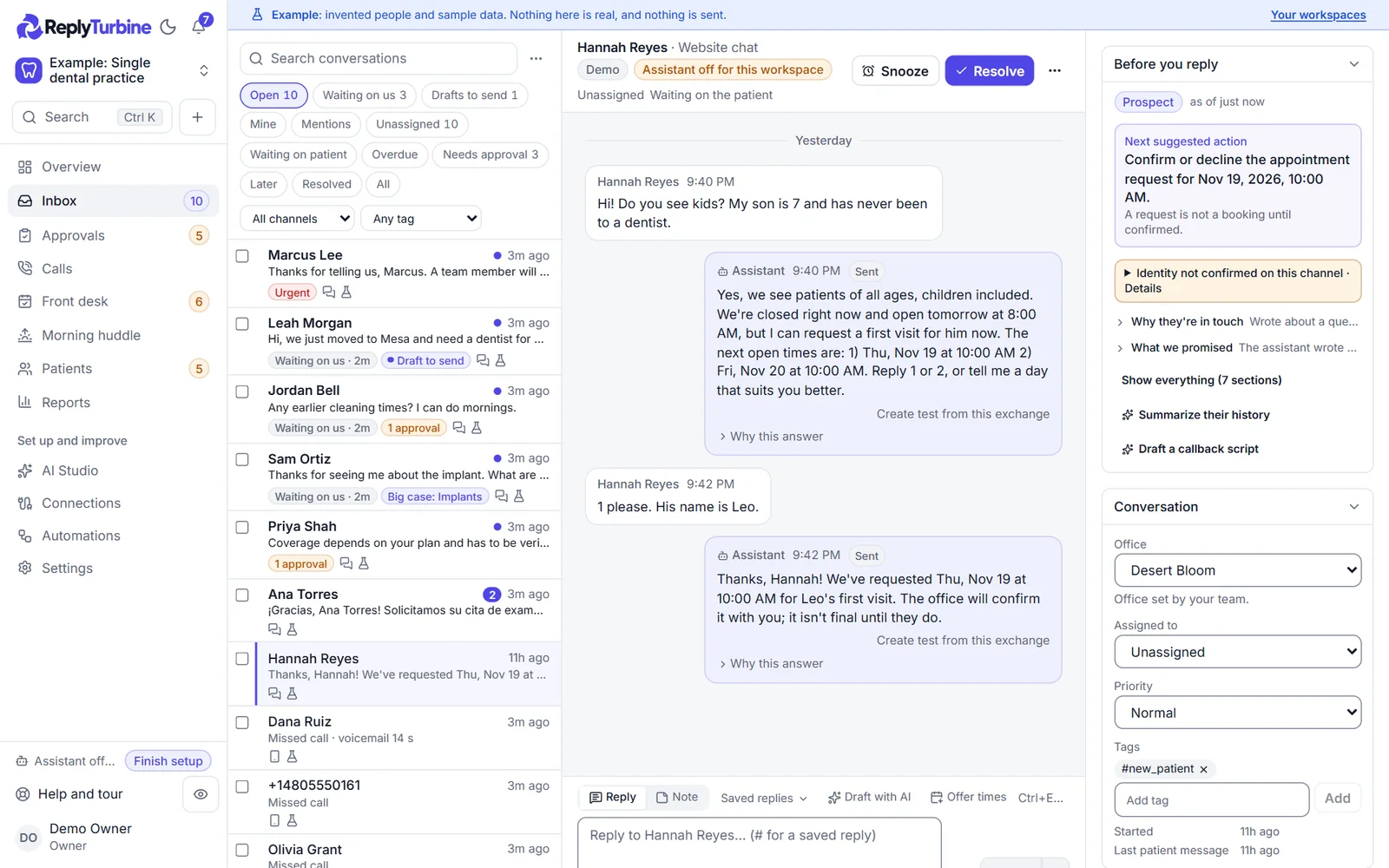
A parent asks about her son's first visit after the office has closed. The assistant answers from the practice's own information, offers open times, and requests the one she picks.

Inbox · website chat · example practiceDemo data
The inbox of the example practice, Desert Bloom Dental. Hannah Reyes writes in website chat at 9:40 PM asking whether the practice sees children; the assistant says it does, that the office is closed and opens at 8:00 AM, and offers two open times. She picks the first, and the assistant says the time is requested and isn't final until the office confirms it. The panel beside it suggests confirming or declining the request.
  1. The question arrives at 9:40 PM, while the office is closed.
  2. The answer comes from the practice's own information, with real open times.
  3. She picks a time and it becomes a request. It isn't final until the office confirms it.
  4. In the morning the next step is waiting: confirm or decline the request.

Step 2 of 7

The morning Front desk

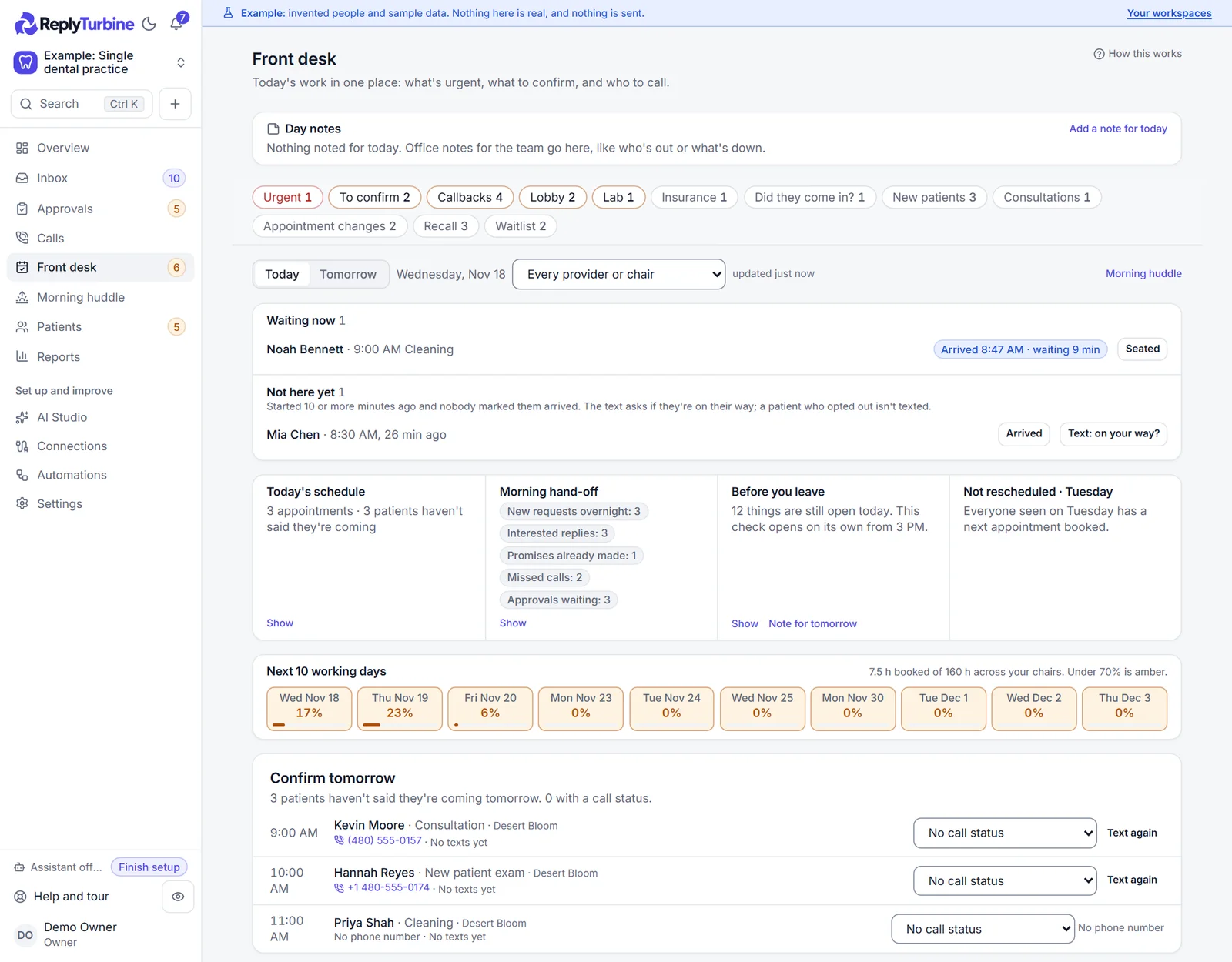
The day on one screen: what is urgent, who is in the lobby, what came in overnight, and who hasn't said they're coming tomorrow.

Front desk · example practiceDemo data
The Front desk of the example practice: a row of queues with counts (urgent, to confirm, callbacks, lobby, lab, insurance and more), a patient waiting in the lobby and one not here yet, today's schedule, the morning hand-off of what came in overnight, the next ten working days, and tomorrow's patients who haven't confirmed, each with a call status.
  1. Every queue with its count: urgent, to confirm, callbacks, the lobby, and more.
  2. Who has arrived and how long they've waited, and who is running late.
  3. The morning hand-off: what came in overnight.
  4. Tomorrow's patients who haven't said they're coming, with a call status for each.

Step 3 of 7

A reminder reply confirms a visit

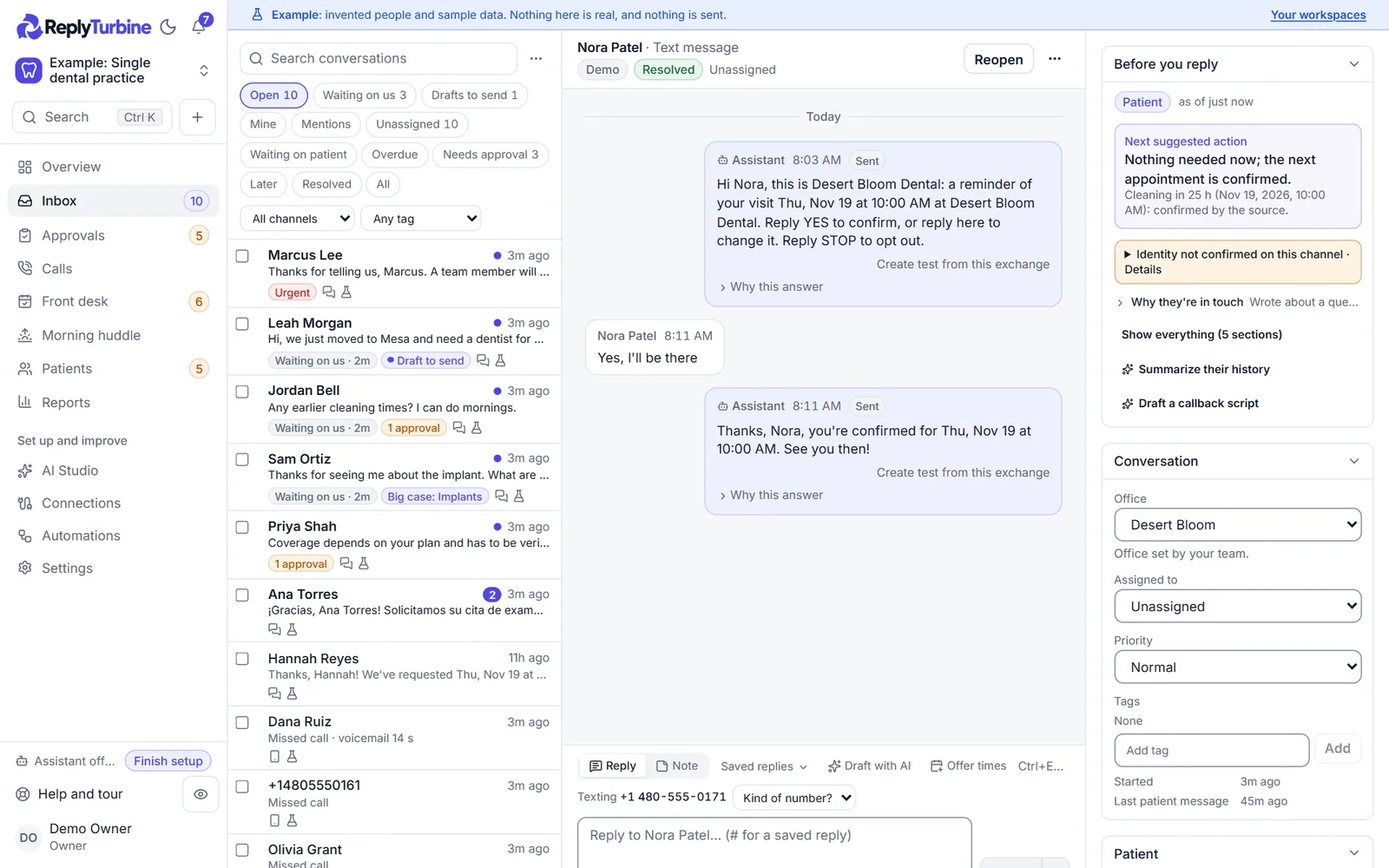
A patient answers her reminder with a yes. The visit is marked as confirmed by the patient, and she gets a fixed thank-you, not one the assistant writes.

Inbox · text message · example practiceDemo data
A text conversation in the example practice. The reminder gives the day, time and office and asks Nora Patel to reply YES to confirm. She replies “Yes, I'll be there”, and the thank-you says she is confirmed. The panel beside it says nothing is needed now because the next appointment is confirmed.
  1. The reminder, with the day, time, and office.
  2. Her reply: “Yes, I'll be there.”
  3. A fixed thank-you, and the visit is marked as confirmed by the patient.
  4. Nothing more to do: the next visit is confirmed.

Step 4 of 7

A 2 PM cancellation, offered to the waitlist

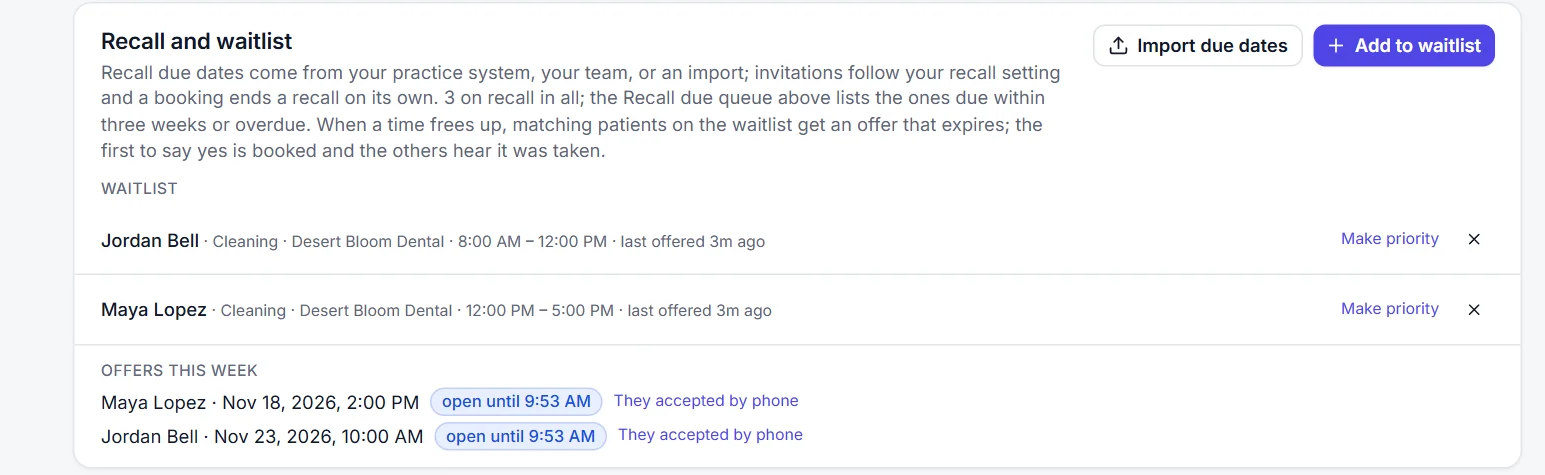
A patient cancels this afternoon's cleaning. The time goes to the patients waiting for one, and the first to say yes is booked.

Front desk · Recall and waitlist · example practiceDemo data
The Recall and waitlist section of the example practice's Front desk. Two patients wait for a cleaning: Jordan Bell in the morning and Maya Lopez from 12:00 to 5:00 PM. Under Offers this week, Maya Lopez has an offer for 2:00 PM today, open until a set time.
  1. When a time frees up, matching patients get an offer that expires. The first to say yes is booked.
  2. Maya wants a cleaning and can come between 12 and 5.
  3. The freed 2:00 PM time went to her, with how long the offer stays open.

Step 5 of 7

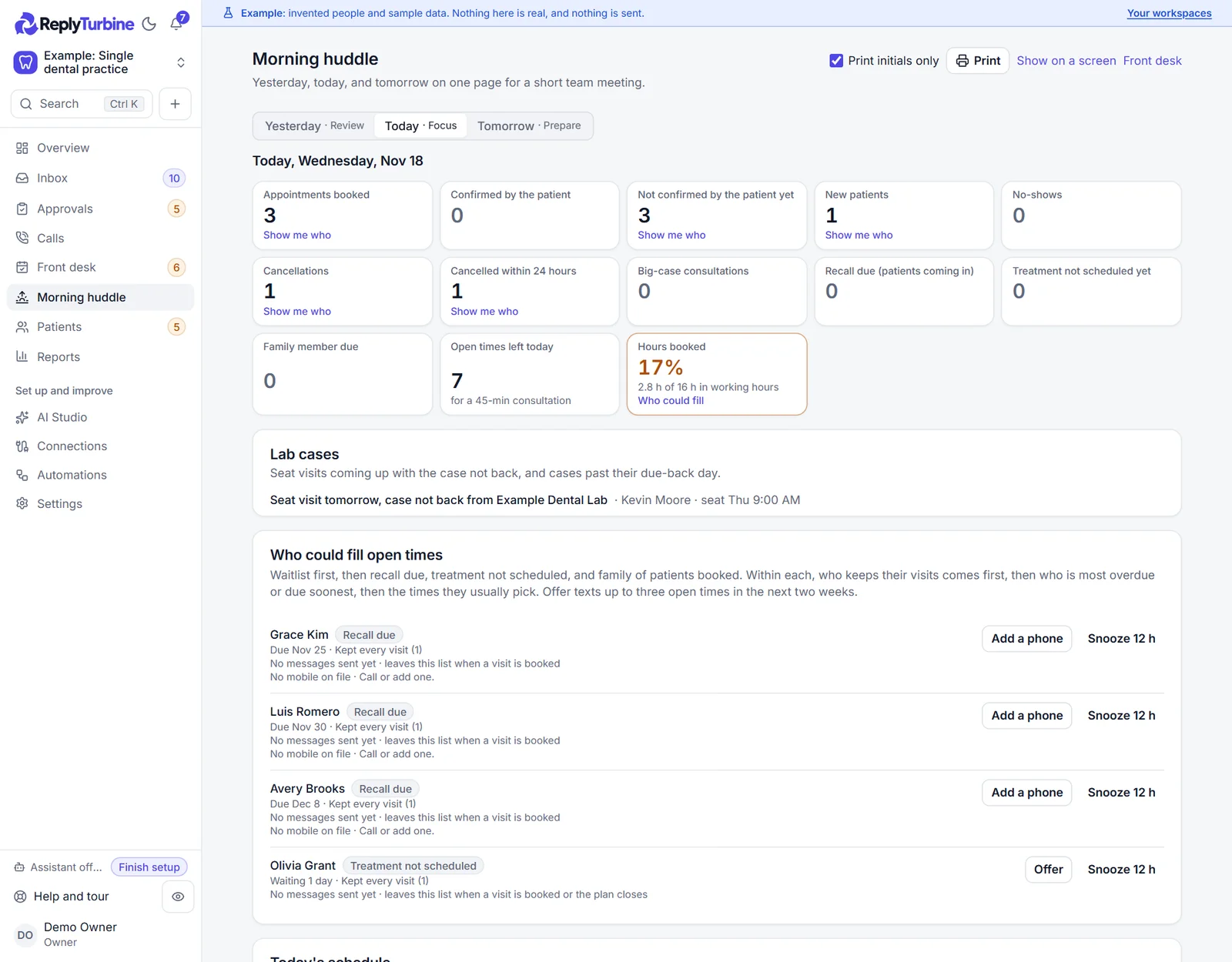
The morning huddle

Yesterday, today, and tomorrow on one page for a short team meeting, counted from the schedule and the records.

Morning huddle · example practiceDemo data
The Morning huddle of the example practice for today: tiles for appointments booked, confirmed by the patient, not confirmed yet, new patients, no-shows, cancellations, recall due and more; hours booked at 17 percent with a link to who could fill; a lab case; and Who could fill open times, listing patients due for recall and one with treatment not scheduled.
  1. Review yesterday, focus on today, prepare for tomorrow.
  2. Each count opens the patients behind it.
  3. How full the chairs are today, and who could fill the gaps.
  4. Who could fill open times: the waitlist first, then recall and the rest.
  5. Print it with initials only, or show it on a screen.

Step 6 of 7

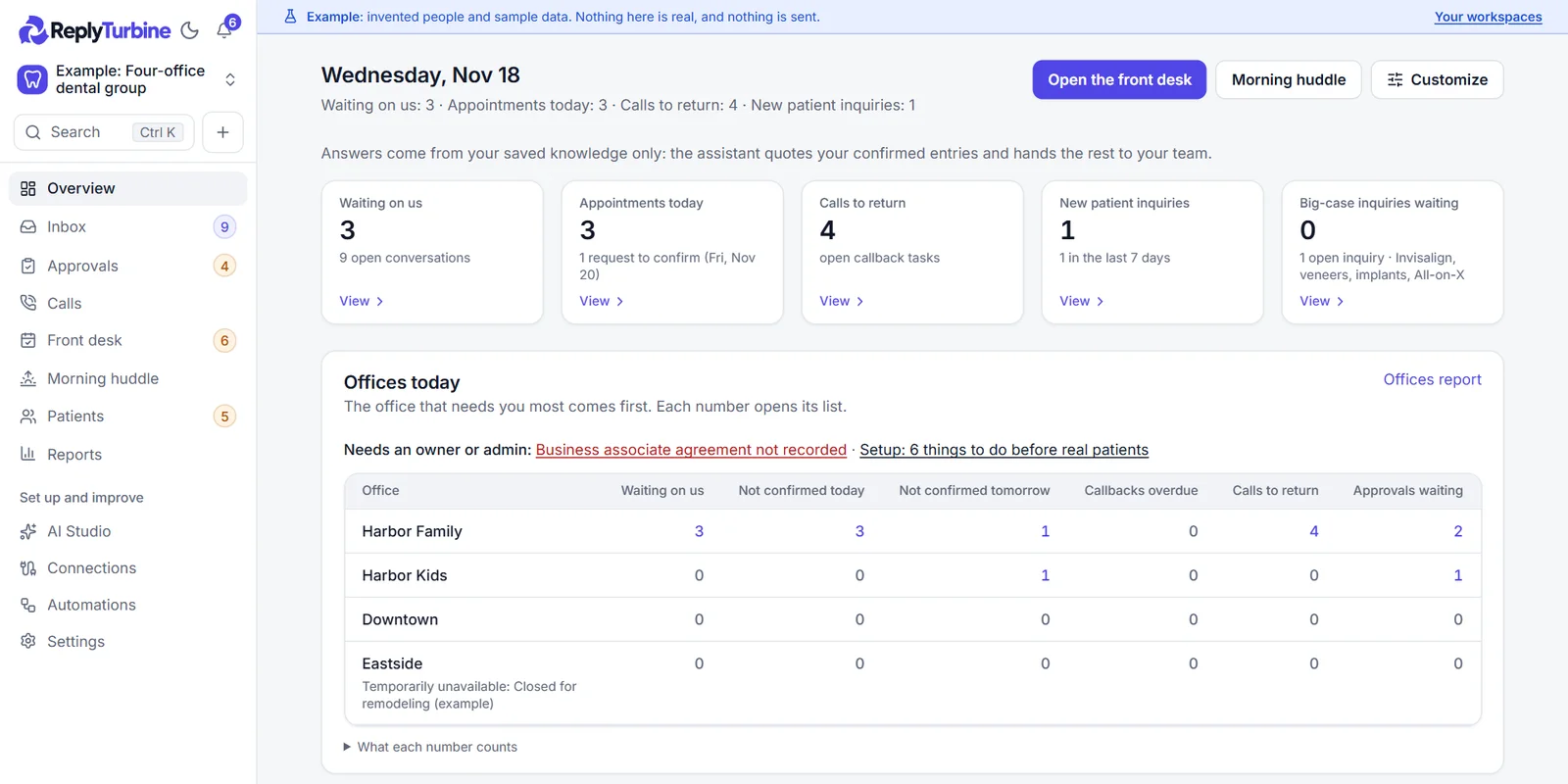
Offices today, for groups

With two or more offices, the Overview has a row for each one, and the office that needs you most comes first.

Overview · four-office group · example practiceDemo data
The Overview of the example four-office dental group. Offices today lists Harbor Family, Harbor Kids, Downtown, and Eastside, which is temporarily unavailable, with replies waiting, visits not confirmed today and tomorrow, callbacks overdue, calls to return, and approvals waiting for each office.
  1. The office furthest behind is at the top.
  2. Each number opens its list.
  3. An office that's temporarily closed says so.
  4. The Offices report puts offices side by side.

Step 7 of 7

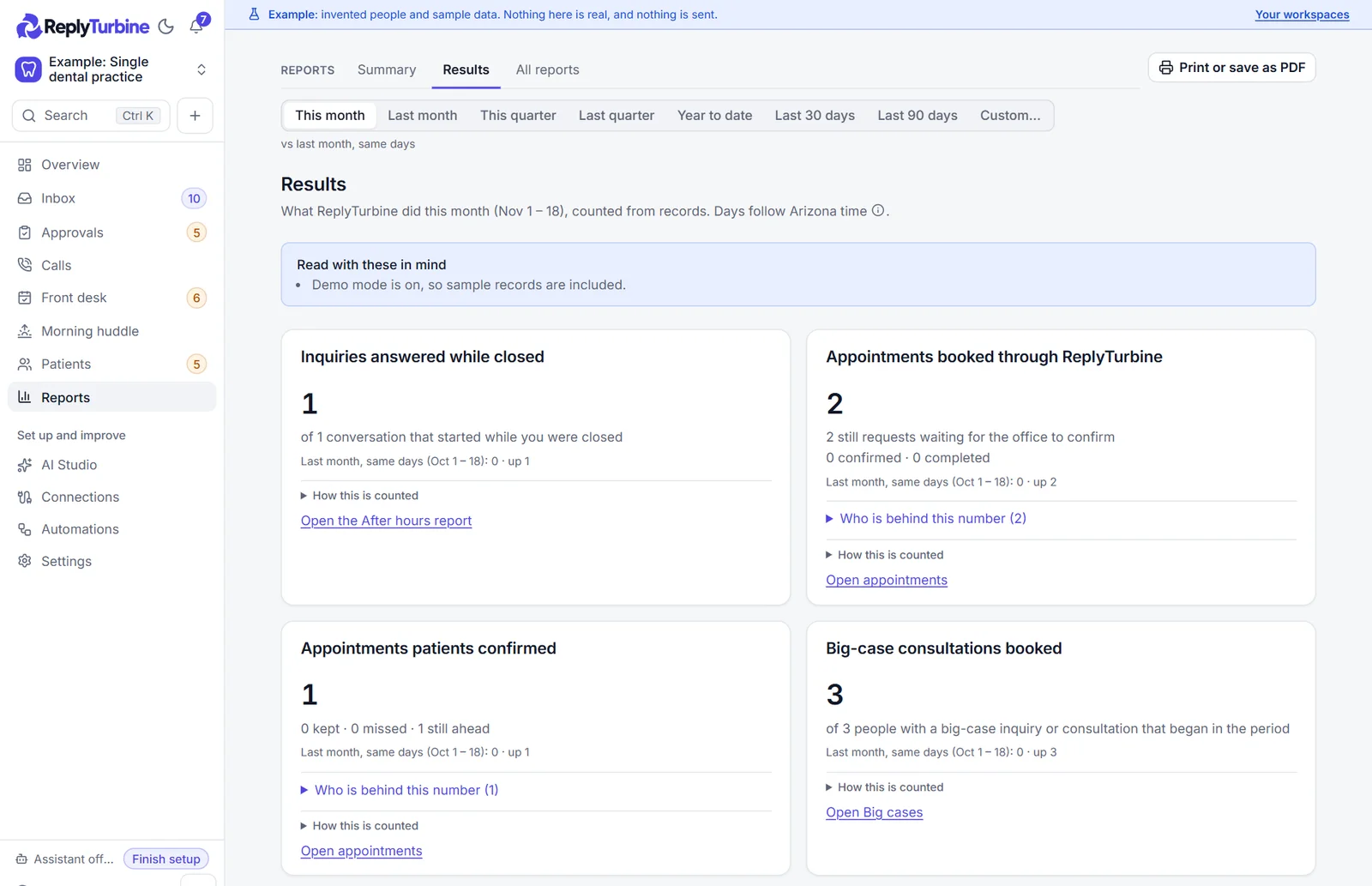
Results, counted from records

What ReplyTurbine did this month, each number counted from a record, with how it is counted and who is behind it.

Reports · Results · example practiceDemo data
The Results page of the example practice for this month: inquiries answered while closed, appointments booked through ReplyTurbine and still waiting for the office to confirm, appointments patients confirmed, and big-case consultations booked, each with last month's count and how it is counted.
  1. This month, last month, a quarter, or your own dates.
  2. Questions answered while the office was closed, like the one at 9:40 PM.
  3. Visits patients confirmed themselves, like the reminder reply.
  4. Who is behind each number, and how it is counted.

Look around it yourself

Open the same example practice in its own workspace and click through every screen. It's a made-up practice with sample patients. Your own setup waits for you.