

← What it does
Answer every patient
Answer patients on your website, even while you're closed
Where it stands:Works today
One snippet adds the chat to your site. It answers from what you've told it, offers real open times at the right office, and hands anything it isn't sure about to your front desk. While you're closed, it says when you open next.
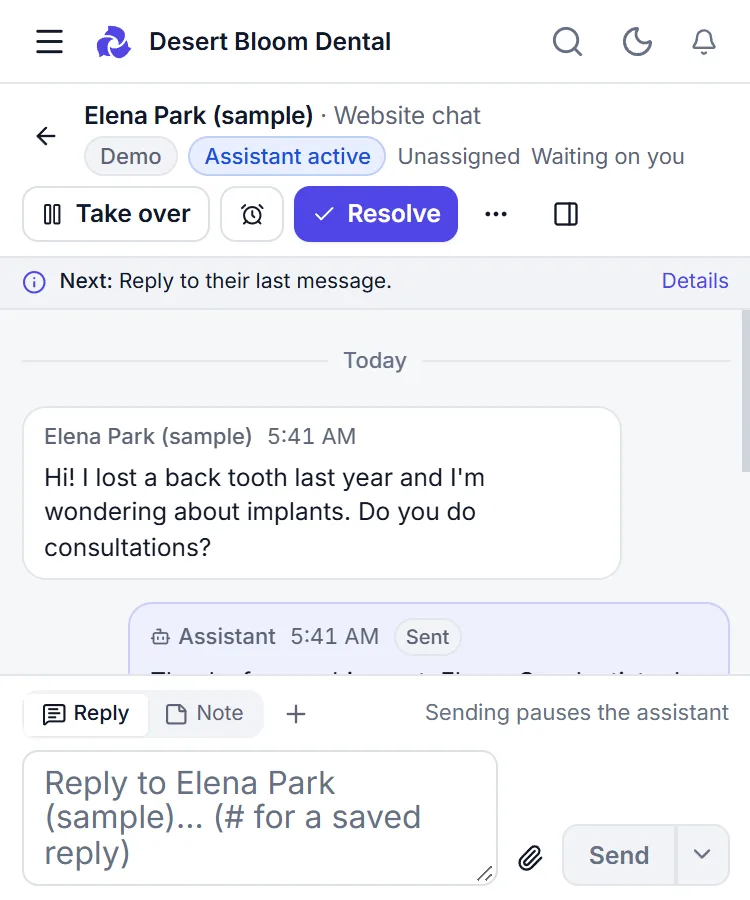
Inbox · website chat · Desert Bloom Dental (Demo)Demo data
What your team does
- Paste one snippet into your site, or into your site builder's custom-code box. Works today
- Each chat is a conversation in your inbox. For a patient on file, their next visit, recall, and missed visits show beside it. Works today
- Anything it can't answer from what you've told it goes to your team, with the reason. Works today
- One set of hours and closed days drives the chat, the reply while you're closed, and your automations. Works today
- The automation “Capture inquiries while we're closed” saves the request and creates a callback due when you next open. Works today
- A greeting bubble for first-time visitors is off until you turn it on. Works today
What patients see
- The chat always says it is an automated assistant, in words you choose after that. Works today
- At a dental practice, a new chat asks for a name and a mobile number, with your consent wording right under the number. Works today
- Patients can pick a real open time at the right office without leaving the chat. Works today
- While you're closed, it says when you open next, in your office's time zone, instead of promising a person. Works today
- Pain, swelling, or an injury gets your practice's urgent instructions and a callback task right away, open or closed. Works today
- Set the chat's language to Spanish and everything it says on its own is in Spanish. Works today
What it never does
- Diagnose or interpret symptoms.
- Confirm insurance coverage or a patient's cost.
- Present itself as a person.
- Promise a person will answer while you're closed.
What it runs on
Works today means it works without our help. In testing means built, and not yet verified with a live account. Not yet means planned.
- Website chatWorks today
- Paste one snippet into your site, or your site builder's custom-code box.
- Built-in schedulerWorks today
- Your hours, appointment types, and providers; visitors book or request a time in chat.
- WordPress plugin and Webflow appNot yet
- The website-chat snippet works on both today.
In Help
Questions
- Does it work on our website builder?
- Yes, on any site where you can paste a snippet or custom code. A WordPress plugin and a Webflow app are planned.
- What happens after hours?
- The chat says when you open next, and patients can still pick an open time or leave a request. The request is on the Front desk when you open.
- What about emergencies?
- Pain, swelling, or an injury gets your practice's urgent instructions and a callback task right away. It never diagnoses.
- Can it answer in Spanish?
- Yes. Set the chat's language to Spanish and everything it says on its own is in Spanish. What you wrote is shown as you wrote it.
More of what it does
- Reminders and confirmationsReminders patients answer: a yes confirms the visit, and a change goes to your front desk.Read more
- Online booking and visit linksA booking page with real open times, and a page for each visit to confirm, move, or cancel.Read more
- Waitlist and schedule fillWhen a time frees up, matching patients get an offer that expires, and the first yes is booked.Read more
- RecallUp to three invitations a cycle, each with a booking link of the patient's own, stopping when they book.Read more
- Missed-call text-backA missed call opens a callback on the Front desk, and the caller gets a text they can answer.Read more
- ReviewsEvery patient asked the same way after a visit, and a 1 or 2 star rating becomes a call from your office.Read more
- Front desk and huddleEach office's day on one screen, with the next action for every item, and a one-page huddle for the morning meeting.Read more
- Reports and ResultsWhat ReplyTurbine did, counted from your own records, and reports with one set of definitions for every office.Read more
Everything for a dental practice, on one page: ReplyTurbine for dental practices.
See it with your own practice
Tell us about your offices and the software you use, and we'll say what works for you today and what is still in testing.