

Test your assistant before customers do
The three ways to test, what each one costs and touches, and what counts as evidence for publishing.
On this page
The five jobs
- AI Studio → Overview shows the five jobs (answer, collect, route, schedule, follow up), what each depends on in your workspace, how many saved scenarios check it, and how those scenarios did: in the last run and over the last five. Start with whatever is marked missing.
Trying it in the Playground
- Interactive simulation (Playground): type as a customer would, against the live configuration, your saved draft, or the published version. Open “Synthetic context” to test as an existing person: the people heard from most recently are offered first, or search by name, email, or phone (their saved name, contact details, and language are used, as in a live conversation; nothing is written to the record), to act as a made-up customer, to pretend no appointment is open, or to add a fact for this test only. Side by side runs the draft and the published configuration on the same message. “Review this answer” under a reply grades how closely it sticks to the information it was given (one more AI request). Testing as an existing person answers with their office's hours and facts (the office of their most recent conversation), named under the person.
- Tone (AI Studio → Behavior → Personality): each tone is shown answering the same question, so you pick by hearing it. “Say it like this” takes up to three replies your team would send; the assistant matches their voice and length and never treats them as facts.
- Open “Synthetic context” and set “Pretend it's” to answer as if it were another local date and time (a Sunday night, a holiday); “Save as scenario” keeps that time as the scenario's pinned clock.
- Under each reply you see how the message was read, whether the reply was grounded in verified knowledge, why it handed off (in plain words), which facts it used, and what each proposed action would do: run on its own, wait for a teammate, or stay blocked, according to your policies and the channel's setting. Nothing is stored, sent, or booked. When a conversation is worth keeping, “Save as scenario” adds it to your saved suite with the turns as typed and the expectation prefilled from what happened.
Saved scenarios
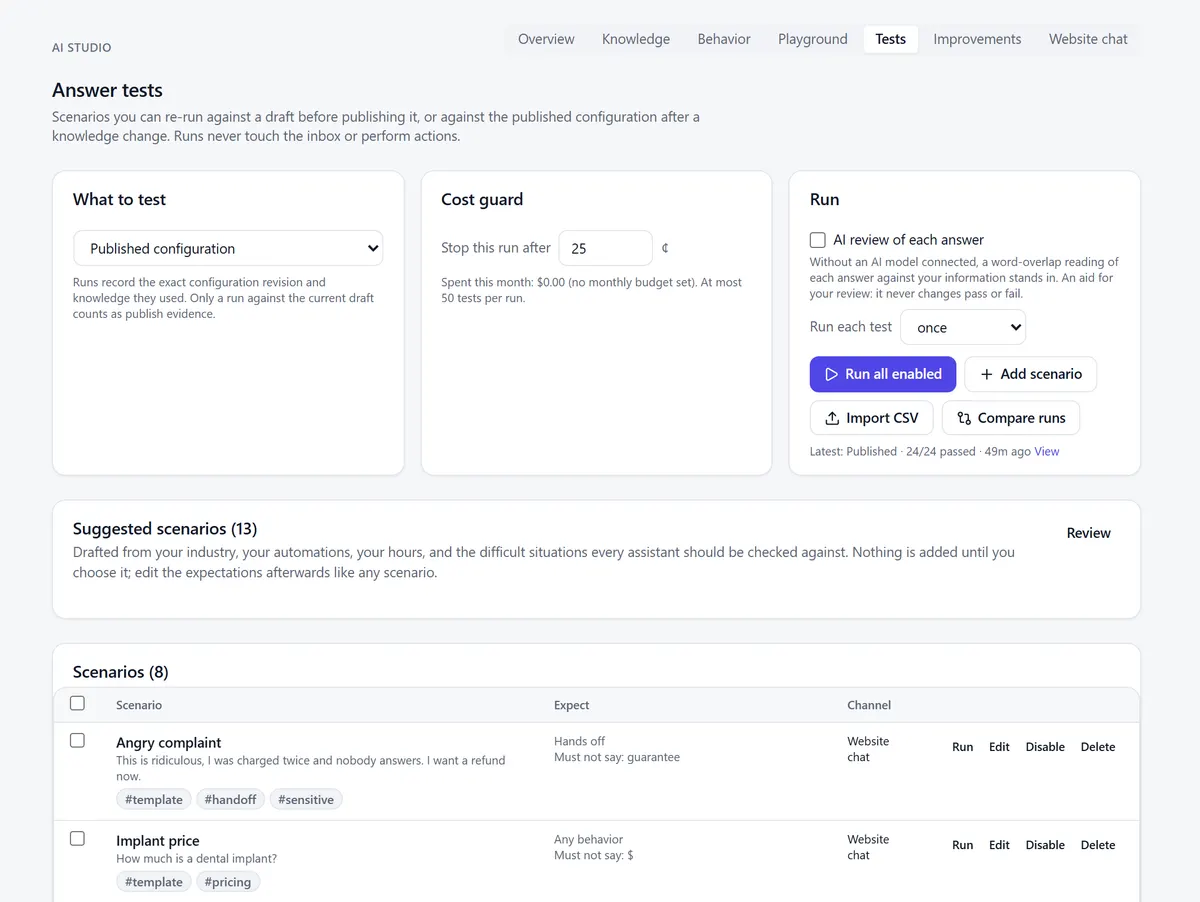
- Saved example questions (AI Studio → Example questions): repeatable multi-turn cases with expectations (what the reply must and must not say, answer or hand off, which actions it proposes). “Suggested example questions” drafts cases from your industry, your automations, your hours, the questions people keep asking that the assistant couldn't answer (from Fix what keeps going wrong), and the difficult situations every assistant should be checked against; nothing is added until you pick it. When writing a scenario, “Fill from an existing person” copies someone's details into the simulated customer; the scenario keeps the copy and isn't linked to their record.
- A scenario can pin the clock: your business's local date and time to run at (“Pinned clock”), so “are you open now?” and same-day answers can be checked on a Sunday night or a holiday. The assistant is told your local time and whether you're open with every message, live and in tests. A scenario can also give a goal for an AI-played customer (“Book a cleaning for next week”): after its scripted messages, an AI plays the customer toward the goal, a few messages at most, and with an AI model connected says whether the goal was reached, which counts as a check. The simulated customer only ever gives the scenario's own details or obviously made-up ones.
- From the inbox, “Create a regression test” on a reply can test from that reply on: everything before it stays exactly as it happened and only that reply is written again. “Run each test” 3 or 5 times shows how steady each answer is (passed 3 of 5, how many different answers); comparisons read each test's first run. Each result lists what every proposed action would have done under the tested configuration (run on its own, wait for a teammate, or stay blocked); nothing runs. Rate results with one click (Good, Acceptable, Poor, with a reason for Poor) and filter to Failed, Not rated, or Poor.
- Tick “AI review of each answer” before a run to have the AI model score, from 1 to 5, how closely each answer sticks to the information it was given, and quote any statement that information doesn't support. It never changes pass or fail and adds one AI request per test; without an AI model, a word-overlap reading stands in and says so. The results export includes the review.
Rolling out and nightly runs
- AI Studio → Behavior → “Roll out to part of your traffic” lets the saved draft answer 10, 20, or 50 percent of new conversations first. Each conversation stays on one side; the card compares the two on real replies (handed off, grounded in your information, visitors' thumbs up), and “Publish to everyone” or “Undo” finishes it in one step. A rollout covers how the assistant answers (personality, instructions, messages, sensitive topics, escalation rules); what actions may run, channel modes, hours, and routing stay the published configuration's until you publish. While one runs, publishing or restoring another version waits until it's finished. Every hour the two sides are compared; once each has 30 replies, if the new version hands off or answers ungrounded at least 10 points more often, owners and admins get one notification, by email too (nothing is undone for you), and the AI Studio overview shows a running rollout at the top.
- “Ask the example questions every night against the published version” (Example questions → Spending limit) runs your saved scenarios each night at 3 am your time within a cost cap, and owners and admins get a notification, by email too, naming any scenario that passed the night before and fails now. It is off until you turn it on, because each night's run spends AI credit.
What counts as evidence
- Runs are bound to the exact draft revision, the knowledge at the time, the AI model, and the assistant engine. If any of those change, the evidence is stale and Publish readiness says so; re-run the tests.
- Provider verification (Settings → Operations → Run the AI check) makes one real request to the AI provider to prove the key works. It is separate from the other modes and may cost a few cents.
Good to know
- Scores and pass marks are review aids for people, not a reason to publish on their own. A simulated booking never reaches your calendar or practice system, never occupies a slot, and never counts in reports.
Was this helpful?
Still stuck? Talk to us, or see what changed lately.